Glossary
What Is Haptyk? Force-Sensitive Typing Sounds Explained
Serhii ChernikovUpdated
Haptyk is a Mac menu bar app that changes typing sound volume with how hard you press. Here is how accelerometer force detection works, where it runs, and when another app is a better fit.
Haptyk sits in a narrow corner of the keyboard-sound category: the volume follows your strike, not just which key you hit. On a supported Apple Silicon MacBook with the built-in keyboard, that can make typing feel more physical than a flat sample. On Intel, a Magic Keyboard, or most external boards, the same app cannot deliver that trick.
What Haptyk is
Haptyk is a macOS 13+ menu bar app. You pick a sound pack, type in any app, and hear keyboard audio on each key event. The differentiator is force-sensitive volume: the app reads the MacBook accelerometer and treats harder keystrokes as louder ones.
Think of it as velocity tiers, not a single WAV at one level. A light tap stays quiet. A firm press gets more presence. That is the whole pitch. It is not a 30-preset keyboard library, a typing trainer, or a visual overlay. Haptyk ships 16+ velocity-tier packs, with no mouse sounds, no trainer, and no on-screen visualizer.
The accelerometer path only makes sense when the keys you are pressing are the same machine the sensor lives in. That is why the hardware gate is strict.
Where Haptyk works vs where it does not
Compatibility is the first question to answer before you install anything in this category.
| Setup | Force-sensitive volume | Notes |
|---|---|---|
| Apple Silicon MacBook, built-in keyboard | Yes, on supported models | This is the intended use case. Accelerometer and keys share one chassis. |
| Intel MacBook | No | Intel Macs are not in scope for Haptyk's force detection. |
| Magic Keyboard (Apple scissor board) | No | External scissor keys do not feed the laptop accelerometer the same way. |
| USB or Bluetooth external keyboard | No (most boards) | Key events may still register, but force volume expects built-in keys on a supported MacBook. |
If your daily driver is a desk setup with an external board, Haptyk's headline feature will not travel with you. That is not a bug in your cable. It is how the sensor is wired.
For a wider look at who supports what, see best keyboard sound apps for Mac.
Price and trial
Haptyk is sold direct from haptyk.com, not the Mac App Store. Pricing is $8 one-time after a 3-day trial. You download the menu bar app, try the velocity-tier packs during the trial window, and pay once if you keep it.
There is no subscription in the public listing.
Who should keep Haptyk
Stay with Haptyk if all of these are true:
- You type on a supported Apple Silicon MacBook using the built-in keyboard
- You want volume that tracks strike force, not a fixed level per key
- You are fine choosing from 16+ velocity-tier packs rather than 30 keyboard presets
In that setup, Haptyk is doing something most menu bar apps in this space do not attempt. The accelerometer link is real, and for the right machine it is the reason to install.
Who wants 30 keyboard presets on any keyboard
CupertinoClicks takes a different path. It listens for key codes and plays 30 keyboard presets – plus Spatial Audio, extra-low latency, and extra-low CPU. It includes a built-in typing trainer and a system-wide on-screen keyboard overlay. It runs on Intel and Apple Silicon with a MacBook keyboard, Magic Keyboard, or most USB and Bluetooth boards. The full names live in the mechanical keyboard switch library.
What CupertinoClicks does not do is force-sensitive volume. Every preset plays at the level you set, regardless of how hard you press. If your keyboard lives outside a supported MacBook chassis, that trade is usually the one you want.
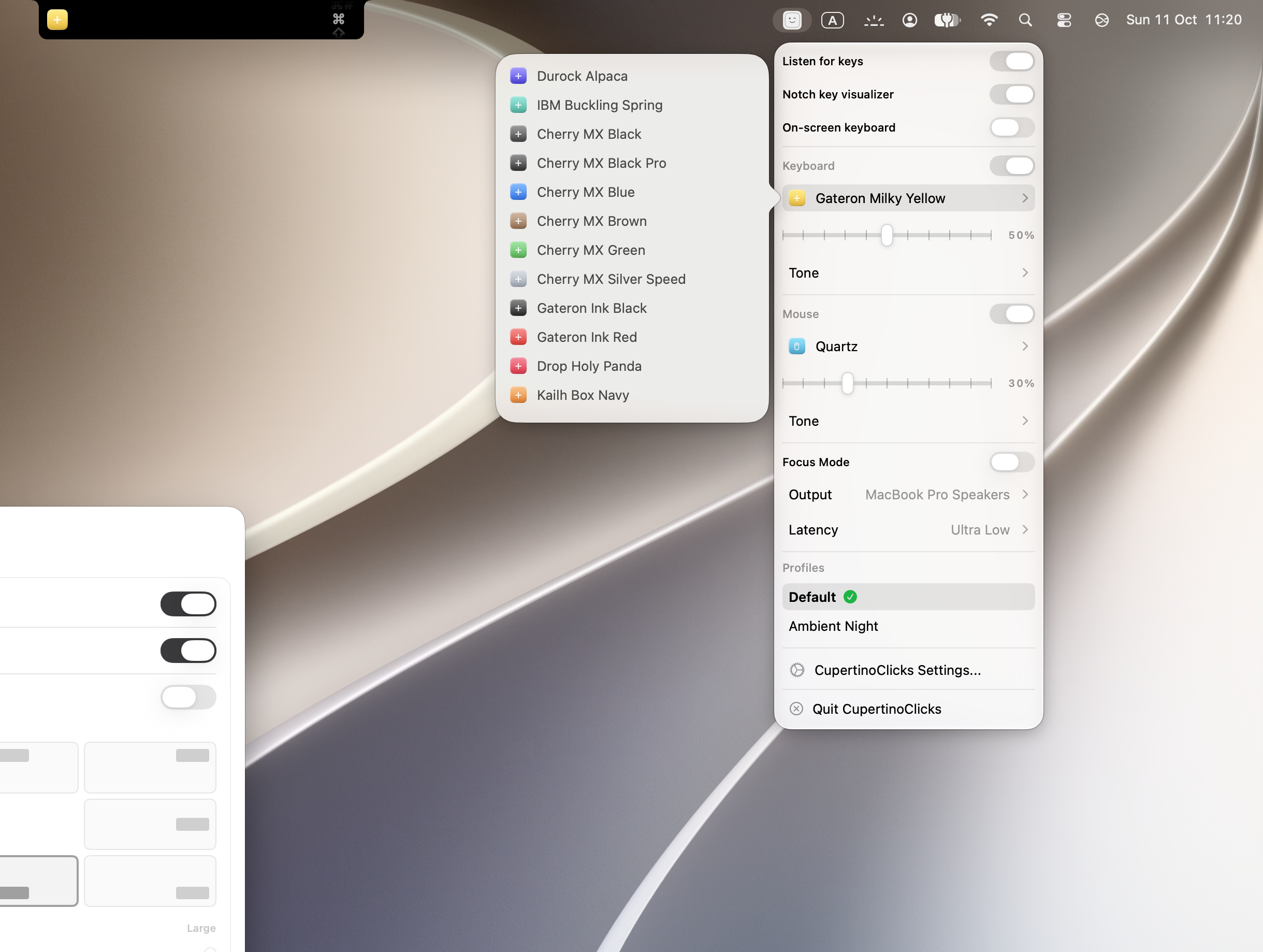
You can hear presets before installing in the online typing trainer. When you are ready to buy, pricing and checkout live on the buy page. For a side-by-side read focused on this split, use the Haptyk alternative page – not a full category ranking, just the two apps most often compared on hardware fit.
Every named preset in CupertinoClicks
CupertinoClicks ships 30 keyboard presets (26 mechanical recordings and 4 novelty packs) plus 5 mouse click presets. The names below match the menu bar. Hear them in the online typing trainer, or read how each switch feels on the mechanical keyboard switch library.
Durock. Durock Alpaca.
IBM. IBM Buckling Spring.
Cherry MX. Cherry MX Black, Cherry MX Black Pro, Cherry MX Blue, Cherry MX Brown, Cherry MX Green, Cherry MX Silver Speed, and Obsidian.
Gateron. Gateron Ink Black, Gateron Ink Red, Gateron Turquoise Tealios, Gateron Milky Yellow, Gateron Green Apple, and Gateron Yellow Pro.
Drop. Drop Holy Panda.
Kailh. Kailh Box Navy.
NovelKeys. Novelkeys Cream.
Alps. Alps SKCM Blue.
Topre. Topre Classic.
Flurples. Flurples Cardboard.
Keychron. Keychron Super Red.
Akko. Akko Creamy Purple and Akko V3 Cream Yellow.
Everglide. Everglide Crystal Purple and Everglide Oreo.
Novelty. Bruh, Gunshot, Spongebob laugh, and Whip.
Mouse clicks
Quartz, Onyx, Porcelain, Steel, and Flint.
Magic Keyboard owners looking for mechanical tone without force volume should read how to make a Magic Keyboard sound mechanical. The setup path is the same permission and preset pick, without the accelerometer requirement.
Input Monitoring and the accelerometer difference
Every serious keyboard sound app needs a way to hear keys while Safari, Slack, or Xcode has focus. Most apps, CupertinoClicks included, use Input Monitoring: key code in, local sample out. No character buffer, no cloud playback for typing.
Haptyk adds a second input: the MacBook accelerometer for typing force. That is a real feature if you want velocity-sensitive volume. It is also a reason to pause if you only wanted speakers and a switch sample. CupertinoClicks does not read typing force. The permission story and what a safe app should never do are in are typing sound apps safe.
FAQ
Does Haptyk work on Intel Macs?
No. Haptyk's force-sensitive volume needs a supported Apple Silicon MacBook with the built-in keyboard. Intel Macs are outside what the accelerometer path supports.
Does Haptyk work with a Magic Keyboard or external board?
Usually no. The accelerometer reads typing force through the laptop chassis, so it expects the built-in keyboard on a supported Apple Silicon MacBook. Most USB and Bluetooth external boards do not qualify either.
Does CupertinoClicks do force-sensitive volume like Haptyk?
No. CupertinoClicks maps key codes to 30 keyboard presets at a set volume. It works on Intel and Apple Silicon with any connected keyboard, but it does not read typing force from the accelerometer.