Glossary
What Is a Thocky Keyboard Sound? Thock vs Clicky vs Clacky
Serhii ChernikovUpdated
A thocky keyboard sound is deep, muted, and low-pitched. See how it differs from clicky and clacky, and how to get that feel on a Mac without new hardware.
People chase thock because it feels heavy and calm during long writing or coding sessions, without the sharp tick of a clicky switch. It has more thud than tick. On a Mac you get that feel from a recording, not from foam and a new case.
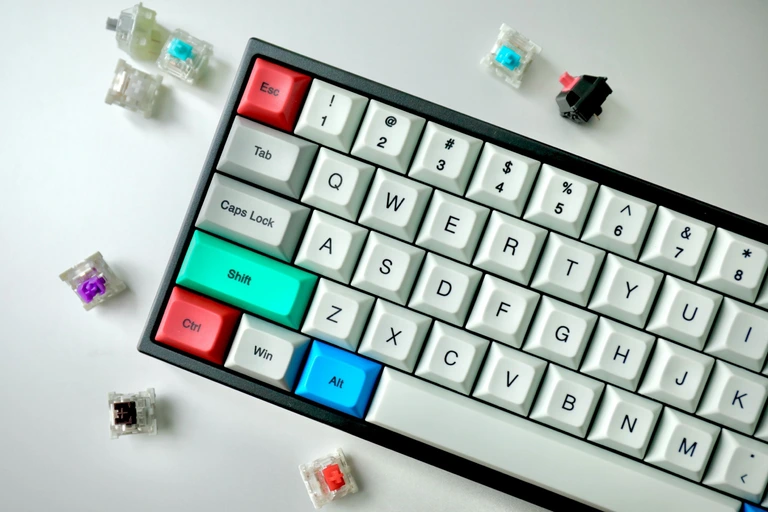
Thock vs clicky vs clacky
These three words show up in switch reviews, sound demos, and menu bar apps. They describe tone, not marketing.
| Trait | Thocky | Clacky | Clicky |
|---|---|---|---|
| Pitch | Low | Mid | High |
| Character | Rounded, damped thud. Short muted finish. | Plastic-on-plastic. Brighter than thock, less of a bell. | Sharp tick. Cherry MX Blue is the usual reference. |
| Typical switch | Deep linear or padded tactile | Many stock laptop keys; some tactiles | Click jacket switches (MX Blue, Box Navy) |
| Shared room | Easier at low volume | Middle | You hear it across a quiet room |
None of these is “better.” A clicky board can feel lively. A thocky board can feel quieter at the same volume. Clack sits in the middle and often matches stock laptop keys that have no foam or lube.
A click jacket is the extra bit inside a clicky switch that makes the tick. Linear and most tactile switches do not have one, which is why they can sound thocky instead.
What creates a thock sound on a real board
On hardware, thock usually comes from a mix of:
- Linear or tactile switches with a deep housing, not a click jacket
- Thicker keycaps
- Case foam or a gasket mount that kills ping
- A desk that does not ring like a snare
You can spend a weekend (and a budget) chasing that recipe. On a MacBook or Magic Keyboard, you do not have those parts. The membrane or scissor stack is already decided.
How to get thock on a Mac
Software is the faster path. A typing sound app plays a recording on each key event, so the laptop you already own can sound like a deep linear or a padded tactile.
In CupertinoClicks, start with a linear or tactile preset rather than a clicky one. Warm linears such as Gateron Ink Black, Cherry MX Black Pro, Durock Alpaca, Novelkeys Cream, and Akko Creamy Purple sit on the thocky side of the mechanical keyboard switch library. Tactile options include Drop Holy Panda, Everglide Oreo, Cherry MX Brown, and Topre Classic. Clicky presets – Cherry MX Blue, Cherry MX Green, Kailh Box Navy, Alps SKCM Blue, and IBM Buckling Spring – carry across a quiet room. Use the Tone Pad to lean toward thock if a preset still feels bright.
Keep volume modest. Thock reads as quality at a low level. Cranked up, even a muted sample starts to sound like a toy.
Every named preset in CupertinoClicks
CupertinoClicks ships 30 keyboard presets (26 mechanical recordings and 4 novelty packs) plus 5 mouse click presets. The names below match the menu bar. Hear them in the online typing trainer, or read how each switch feels on the mechanical keyboard switch library.
Durock. Durock Alpaca.
IBM. IBM Buckling Spring.
Cherry MX. Cherry MX Black, Cherry MX Black Pro, Cherry MX Blue, Cherry MX Brown, Cherry MX Green, Cherry MX Silver Speed, and Obsidian.
Gateron. Gateron Ink Black, Gateron Ink Red, Gateron Turquoise Tealios, Gateron Milky Yellow, Gateron Green Apple, and Gateron Yellow Pro.
Drop. Drop Holy Panda.
Kailh. Kailh Box Navy.
NovelKeys. Novelkeys Cream.
Alps. Alps SKCM Blue.
Topre. Topre Classic.
Flurples. Flurples Cardboard.
Keychron. Keychron Super Red.
Akko. Akko Creamy Purple and Akko V3 Cream Yellow.
Everglide. Everglide Crystal Purple and Everglide Oreo.
Novelty. Bruh, Gunshot, Spongebob laugh, and Whip.
Mouse clicks
Quartz, Onyx, Porcelain, Steel, and Flint.
A quick listen test
Type a sentence on your Mac with no sound pack. If the stock keys already feel thin and high, a thocky preset will be the biggest change. If you already like a sharp tick, a clicky preset will feel closer to what you expect from a mechanical board.
Then try the same sentence in the online typing trainer. You can compare presets without installing anything. When you want that sound in Slack, Safari, and Xcode, install the Mac app and pick the same switch from the menu bar.
Common mix-ups
Thock is not the same as “quiet.” A deep sample can still be loud if the volume slider is high. It is also not the same as a typewriter. Vintage typewriter audio is usually clacky and metallic. If that is the vibe you want, read typewriter vs mechanical keyboard sounds.
Novelty joke packs in CupertinoClicks (Bruh, Gunshot, Spongebob laugh, and Whip) are not thock either. They are separate on purpose so the switch list stays honest.
If you want this on a Magic Keyboard
The same recordings play on Apple’s scissor board. Setup is the same as any other keyboard: grant Input Monitoring, pick a warm preset, and type. The hardware-specific notes are in how to make a Magic Keyboard sound mechanical.
FAQ
Is a thocky keyboard quieter than a clicky one?
Usually at the same volume, yes. Thock is low and damped, so it reads as calmer. Clicky is high and sharp, so it carries across a quiet room. Volume still matters: a deep sample cranked up is not quiet. Thock is a tone, not a mute switch.
Is thock the same as a typewriter sound?
No. Vintage typewriter audio is usually clacky and metallic, with a bright strike. Thock is a muted, low-pitched mechanical switch sound. If you want the office-machine vibe, read typewriter vs mechanical keyboard sounds.
How do I get a thocky sound on a MacBook?
Play a warm linear or tactile recording in a typing sound app. You cannot add case foam to a MacBook or Magic Keyboard. In CupertinoClicks, start with Gateron Ink Black, Cherry MX Black Pro, Durock Alpaca, Akko Creamy Purple, Everglide Oreo, or Drop Holy Panda, then use the Tone Pad if the preset still feels bright.